Showing posts with label Software. Show all posts

Wednesday, July 26, 2023

Booking.com Auto Login/Register and Displaying Hotels with Credits Checker


Booking.com Auto Login/Register and Displaying Hotels with Credits

Booking.com Auto Login/Register is a powerful tool developed using C# dotnet core and puppeteer-sharp to automate the login or registration process on the Booking.com platform. Additionally, the tool can display a list of hotels that offer credits, although manual payment is still required. This article explores the functionalities of the Booking.com Auto Login/Register tool, along with its configuration settings in the appsettings.json file.

Automating Booking.com with Auto Login/Register

Booking.com is a widely-used platform for booking hotels and accommodations worldwide. Automating the login or registration process can save users time and streamline their booking experience. The Booking.com Auto Login/Register tool is designed to automatically handle the login or registration process on behalf of the user, reducing the need for manual input and clicks.

Displaying Hotels with Credits

Booking.com offers various promotional deals, including credits that users can redeem for discounts on hotel bookings. The tool can display a list of hotels that offer such credits, allowing users to take advantage of these special offers while making manual payments for their bookings.

Appsettings.json Configuration

The appsettings.json file contains configuration settings that users can customize according to their preferences. Some of the settings that can be adjusted include the browser path, city selection, check-in and check-out dates, and more. This flexibility allows users to tailor the tool to their specific booking needs and preferences.

Using the Tool Responsibly

While the Booking.com Auto Login/Register tool can enhance the booking experience and save time, it is essential to use it responsibly and ethically:

  • Personal Use Only: Limit the usage of the tool to your own Booking.com account or with explicit permission from the account owner.
  • Compliance with Booking.com’s Policies: Ensure that the tool adheres to Booking.com’s terms of service and policies to avoid any violations.
  • No Unauthorized Access: Avoid using the tool for unauthorized access or any malicious activities on the platform.
  • Data Privacy: Handle any user data or personal information with care and in compliance with applicable data privacy laws and regulations.

Saving History of Hotels with Rewards

In addition to the tool’s functionalities, the latest update includes the capability to save the history of hotels that offer rewards into a .csv file. This feature allows users to keep track of hotels with credits and easily reference the information for future bookings.

Conclusion

The Booking.com Auto Login/Register tool is a valuable asset for automating the login or registration process on Booking.com, improving the user experience and saving time. Additionally, the ability to display hotels with credits and the option to save this information in a .csv file enhances the booking process and helps users make informed decisions.

Responsible usage of the tool, along with compliance with Booking.com’s policies and data privacy regulations, ensures a positive and secure experience for all users. By leveraging the power of automation responsibly, users can enjoy a seamless booking experience on the Booking.com platform.

Please remember that the tool is intended for personal use and should not be used for any unauthorized access or malicious activities. Use the Booking.com Auto Login/Register tool responsibly and ethically to make the most of your booking endeavors.


DOWNLOAD

Tuesday, July 25, 2023

Reverse IPs: Tools for Discovering Hosted Domains from IPs


Reverse IPs: Tools for Discovering Hosted Domains from IPs

Reverse IPs tools are valuable resources that help identify hosted domains associated with specific IP addresses. These tools are particularly useful for network administrators, cybersecurity professionals, and website owners who want to gain insights into the domains hosted on particular IP addresses. This article explores the significance of Reverse IPs tools, their functionalities, and how they contribute to enhancing online security.

Understanding Reverse IPs

In the context of networking, IP addresses are numerical labels assigned to devices connected to a computer network. Each website or domain hosted on the internet has an associated IP address. Reverse IPs tools perform a reverse DNS lookup, enabling users to discover the domains or websites hosted on specific IP addresses.

The Importance of Reverse IPs Tools

Reverse IPs tools offer several key benefits:

  • Security and Network Monitoring: These tools allow network administrators and cybersecurity professionals to monitor IP addresses for any suspicious or unauthorized domains hosted on their networks.
  • Website Owners: Website owners can use Reverse IPs tools to identify other websites hosted on the same IP address, which can be helpful for various purposes, including detecting potential spam or unauthorized content.
  • Investigations: In cybersecurity investigations, Reverse IPs tools help trace the origin of malicious activities or cyberattacks by identifying domains linked to specific IP addresses.
  • Research: Researchers and analysts can use these tools to study website hosting patterns and explore relationships between different domains.

Functionalities of Reverse IPs Tools

Reverse IPs tools offer the following functionalities:

  • Reverse DNS Lookup: The core function of these tools is to perform a reverse DNS lookup, converting IP addresses into corresponding domain names.
  • Multiple IP Lookup: Many tools support batch or bulk IP lookup, enabling users to analyze multiple IP addresses at once.
  • Additional Information: Some tools may provide additional details about the hosted domains, such as geographical location, hosting provider, and registration information.
  • API Integration: Several Reverse IPs tools offer API integration, allowing users to automate queries and integrate the tool’s functionalities into other applications or services.

Using Reverse IPs Tools Responsibly

While Reverse IPs tools are valuable resources, it is crucial to use them responsibly and ethically:

  • Legitimate Purposes: Utilize Reverse IPs tools only for legitimate and authorized purposes, such as network monitoring, cybersecurity investigations, or research.
  • Respect Privacy: Be mindful of data privacy and ensure compliance with relevant privacy laws and regulations when using these tools.
  • No Unauthorized Access: Avoid using Reverse IPs tools to gain unauthorized access to domains or networks.
  • Educational Purposes: Encourage the responsible use of Reverse IPs tools for educational purposes, promoting awareness of online security.

Conclusion

Reverse IPs tools play a vital role in identifying hosted domains associated with specific IP addresses. These tools offer valuable insights for network administrators, cybersecurity professionals, website owners, and researchers. By using Reverse IPs tools responsibly, we can enhance online security, protect networks from potential threats, and gain valuable knowledge about website hosting patterns.

Always prioritize ethical practices and adhere to relevant laws and regulations when using Reverse IPs tools. Responsible usage contributes to a safer and more secure digital environment for everyone.


Download Tools

Saturday, July 22, 2023

Mail-Access-Bruter


Mail-Access-Bruter: Enhancing Security for Mail Access

Mail-Access-Bruter is a Python script designed to perform a brute force attack for mail access. This tool is intended to improve the security of mail accounts by testing their vulnerability to password guessing attacks. This article explores the features of Mail-Access-Bruter and the modules required for its installation.

Modules Required for Installation

To install Mail-Access-Bruter and its required modules, use the following code:

pip install -r requirements.txt

Key Features

Mail-Access-Bruter offers the following features:

  • Automated Proxy Scraping: The tool automatically scrapes HTTP(S) proxies, eliminating the need for users to provide their own proxies.
  • Brute Force Attack: Mail-Access-Bruter performs a brute force attack to test the security of mail accounts. This involves systematically trying all possible password combinations until the correct one is found.
  • Automatic Saving of Good Hits: The tool automatically saves successful attempts, allowing users to review and analyze the results.

Using Mail-Access-Bruter Responsibly

It is essential to use Mail-Access-Bruter responsibly and ethically. Brute force attacks can be harmful and illegal when used against accounts without proper authorization. Follow these guidelines to ensure responsible usage:

  • Legal Authorization: Only use Mail-Access-Bruter on mail accounts for which you have explicit permission to perform a brute force attack. Unauthorized access to accounts is strictly prohibited.
  • Personal Use Only: Limit the usage of Mail-Access-Bruter to your own mail accounts or accounts you have been authorized to test.
  • Educational Purposes: Consider using Mail-Access-Bruter as an educational resource to understand the risks of weak passwords and raise awareness about password security.
  • Data Protection: Ensure that any data collected during testing is handled responsibly and in compliance with privacy laws and regulations.

Disclaimer

Mail-Access-Bruter, along with any other tools used for brute force attacks, should not be employed for malicious purposes or any activities that violate ethical standards and legal regulations. Unauthorized access to accounts is a criminal offense and can lead to severe consequences.

This article does not endorse or encourage any illegal activities or unauthorized access to accounts. It is crucial to prioritize ethical practices and use Mail-Access-Bruter responsibly for authorized purposes only.

Remember, the ultimate goal of Mail-Access-Bruter is to raise awareness about password security and promote the use of strong passwords to protect mail accounts from potential threats.


DOWNLOAD TOOLS

Discord Nitro Code Generator and Checker


Discord Nitro Code Generator and Checker: A Fast and Automated Tool

The Discord Nitro Code Generator and Checker is a powerful tool designed to generate and check Discord Nitro codes at an impressive rate of 2000 attempts per minute. This article explores the main features of the tool, its setup process, and provides a disclaimer about its usage.

Main Features of the Discord Nitro Code Generator and Checker

The tool offers several key features to streamline the generation and checking of Discord Nitro codes:

  • High-Speed Code Generation and Checking: The tool operates at a remarkable speed of 2000 attempts per minute, making the process swift and efficient.
  • Fully Automated Functionality: The generator and checker run infinitely, eliminating the need for manual restarts every hour.
  • Proxy Scrapper and Checker: The tool comes equipped with a built-in proxy scrapper and checker, providing added security and anonymity.
  • Automatic Nitro Redemption: The tool can automatically redeem Nitro codes, simplifying the process for users.
  • Download Fresh Proxies: The tool enables users to download fresh HTTP(S)/SOCKS proxies while checking codes, ensuring a continuous flow of proxies.
  • Webhook Support: Full webhook support allows users to receive real-time stats and notifications.
  • Real-Time Stats: Users can access real-time statistics, providing insights into the code generation and checking process.

Setup Instructions

Follow these steps to set up the Discord Nitro Code Generator and Checker:

  1. Download a compiled release from the release page.
  2. Edit the configuration variables in the “config.yml” file according to your preferences.
  3. (Optional) Paste fresh HTTP(S)/SOCKS proxies into the respective files: “required/http-proxies.txt” and “required/socks-proxies.txt”.
  4. Start the generator by opening the downloaded executable file.

⚠ Disclaimer

The Discord Nitro Code Generator and Checker, along with the information provided, is intended for educational purposes and serves as a proof of concept. The creator does not promote the usage of the tool for malicious purposes and does not take responsibility for any misuse of the tool.

Stealing Nitro codes translates to stealing money from individuals and is strictly against Discord’s Terms of Service (TOS). The tool should not be used for unethical activities or any purposes that violate legal and ethical guidelines.

Please exercise responsible usage and adhere to the Terms of Service set by Discord when using this tool. The misuse of such tools can have severe consequences, and it is essential to prioritize ethical practices and responsible behavior in the digital landscape.

Remember, the primary goal of this tool is for educational purposes, and it should not be used for malicious intents or activities that harm others or violate any regulations.

Download Tools

Valorant Account Checker


Valoran Account Checker: Enhancing Security for Your Valorant Accounts

The Valoran Account Checker is a powerful tool designed to enhance the security and verification process for Valorant accounts. As the popularity of the game Valorant continues to grow, so does the need to protect and verify the authenticity of player accounts. This article explores the significance of the Valoran Account Checker, its features, and the importance of securing your Valorant accounts.

The Importance of Account Security in Valorant

Valorant, developed by Riot Games, is a competitive first-person shooter game with a rapidly expanding player base. With the increasing popularity of the game, cyber threats targeting player accounts have become more prevalent. Account breaches, unauthorized access, and stolen credentials are some of the risks that players face.

Account security is vital to safeguarding your in-game progress, skins, and other valuable items. It also protects you from potential scams, data theft, and loss of personal information. The Valoran Account Checker plays a crucial role in identifying potential vulnerabilities in account credentials and helping players take necessary precautions to secure their accounts.

The Valoran Account Checker: Features and Functionality

The Valoran Account Checker offers a range of features to strengthen account security:

  • Account Verification: The tool verifies the authenticity of Valorant accounts, ensuring that players have genuine and secure access to the game.
  • Password Strength Analysis: The Account Checker assesses the strength of passwords associated with Valorant accounts, encouraging users to adopt strong and unique passwords for improved security.
  • Multi-Factor Authentication (MFA) Support: The tool prompts players to enable MFA for additional account protection. MFA adds an extra layer of security, requiring users to provide a second form of authentication, such as a one-time code sent to their mobile device, along with their password.
  • Breach Monitoring: The Account Checker can monitor account credentials against known data breaches to identify potentially compromised accounts.
  • Automatic Password Reset: In the event of a suspected security breach, the tool can facilitate an automatic password reset to protect the account from unauthorized access.

Using the Valoran Account Checker Responsibly

While the Valoran Account Checker is a valuable resource, it is essential to use it responsibly and ethically:

  • Personal Use Only: Only use the Account Checker for your own Valorant accounts or with explicit permission from the account owner.
  • Privacy and Data Protection: Ensure that the tool complies with privacy laws and regulations to protect user data and account credentials.
  • Educational Purposes: Use the Account Checker to raise awareness about account security and encourage others to adopt safer practices for their gaming accounts.
  • Stay Updated: Keep the tool and its dependencies up to date to ensure optimal performance and security.

Conclusion

The Valoran Account Checker is a valuable ally in the fight against account breaches and unauthorized access in Valorant. By proactively verifying account authenticity, promoting strong passwords, and encouraging multi-factor authentication, the tool helps players protect their accounts and enjoy a safer gaming experience. Responsible use of the Valoran Account Checker fosters a community dedicated to enhancing account security and safeguarding the enjoyment of the game for all players.

Remember, account security is a collective responsibility. By utilizing the Valoran Account Checker and adhering to best security practices, Valorant players can create a stronger, more secure gaming environment for everyone.

DOWNLOAD VALORAN TOOLS

Twitter Account KekER


Twitter Checker: Strengthening Account Security for Twitter Users

The Twitter Checker is a valuable tool designed to enhance the security and protection of Twitter accounts. Twitter, being one of the most popular social media platforms, attracts numerous cyber threats and attacks targeting user accounts. This article delves into the significance of the Twitter Checker, its features, and the importance of safeguarding your Twitter account from potential security breaches.

The Importance of Account Security on Twitter

Twitter serves as a prominent platform for connecting with friends, sharing thoughts, and engaging with communities. As a result, user accounts often contain personal information, conversations, and sensitive data. Maintaining the security of Twitter accounts is paramount to safeguarding user privacy, preventing unauthorized access, and mitigating potential online threats.

Account security on Twitter involves protecting the account from unauthorized logins, data breaches, and malicious activities. The Twitter Checker plays a crucial role in strengthening security measures and identifying potential vulnerabilities that could compromise user accounts.

The Twitter Checker: Features and Functions

The Twitter Checker offers a variety of features to enhance account security:

  • Account Verification: The tool verifies the legitimacy and authenticity of Twitter accounts, ensuring users have genuine access to their profiles.
  • Password Strength Analysis: The Twitter Checker assesses the strength of account passwords, encouraging users to create strong and unique passwords for added protection.
  • Login Monitoring: The tool keeps track of login attempts and flags suspicious activities, helping users detect potential unauthorized access.
  • Multi-Factor Authentication (MFA) Support: The Twitter Checker encourages users to enable MFA, providing an extra layer of security by requiring additional authentication steps beyond the password.
  • Email and Notification Alerts: The tool can notify users via email or other means if any suspicious activities or login attempts are detected.

Using the Twitter Checker Responsibly

Responsible and ethical usage of the Twitter Checker is of utmost importance:

  • Personal Use Only: Utilize the Twitter Checker solely for your own Twitter account or with explicit permission from the account owner.
  • Data Protection: Ensure that the tool adheres to privacy laws and regulations, respecting user data and account information.
  • Educational Purposes: Promote the use of the Twitter Checker to educate others about account security and encourage better protection practices.
  • Stay Informed: Keep the tool updated, along with any relevant dependencies, to maintain optimal functionality and security.

Conclusion

The Twitter Checker is a valuable asset in safeguarding Twitter accounts and preserving user privacy and security. By proactively verifying account authenticity, encouraging strong passwords, and promoting the adoption of multi-factor authentication, the tool helps users protect their Twitter accounts from unauthorized access and potential threats.

Remember, securing Twitter accounts is a collective responsibility. By utilizing the Twitter Checker responsibly and advocating for enhanced security practices, Twitter users can contribute to creating a safer and more secure online environment for everyone.

DOWNLOAD TOOLS

Wednesday, July 19, 2023

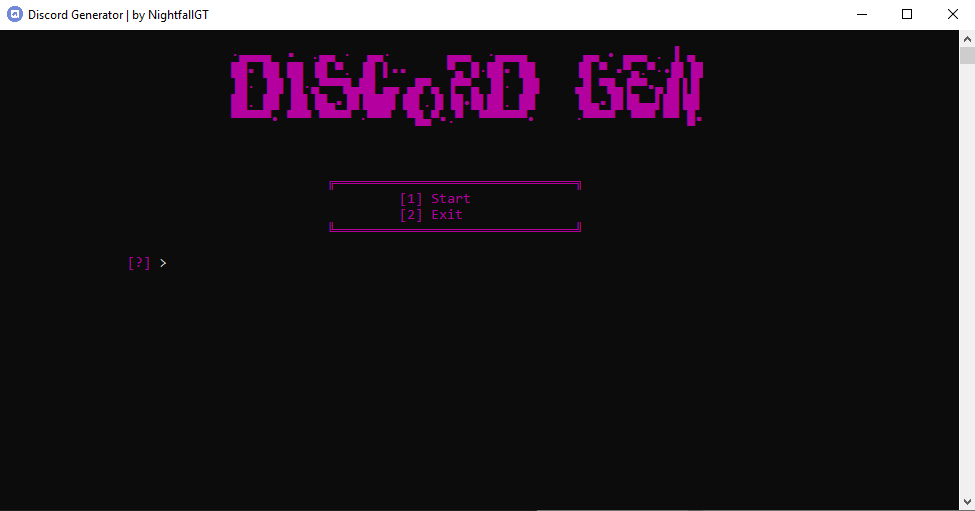
Discord Account Generator


Discord Account Generator: Automating Account Creation for Educational Purposes

The Discord Account Generator is a proof-of-concept script that showcases the automation of Discord account creation without the need for manual interaction on the browser. By automating the account creation process, this script demonstrates how accounts can be generated effortlessly, excluding captcha verification (h-Captcha only requires a click). The script also automatically verifies Discord accounts via email and saves the login information in the “login.txt” file in the format email:password:token. It’s important to note that this script is intended for educational purposes only.

Chromedriver Fix

If Chrome fails to open or crashes, you can resolve the issue by downloading the latest version of “chromedriver.exe” from the official Chromedriver website. Replace the existing “chromedriver.exe” file in the folder with the downloaded latest version.

Ensure that the version of your “chromedriver.exe” file matches your current Chrome web browser version. To check your Chrome version, open Chrome and paste “chrome://settings/help” in the address bar.

Features of Discord Account Generator

The Discord Account Generator offers a range of features that streamline the account creation process:

  • Auto Email Scraping: The script automatically scrapes emails for account creation.
  • Random Username Generation: Usernames are randomly generated from a list.
  • Random Password Generation: Random passwords are generated for each account.
  • Random Date Generation: The script generates random birthdates for account creation.
  • Auto-Email Verification: Discord account verification via email is automatically handled.
  • Automatic Saving of Login Info: Login information, including email, password, and token, is automatically saved in the “login.txt” file.
  • Proxy Support: The script supports proxies for added anonymity and flexibility.
  • Multi-Threading: The script utilizes multi-threading to enhance performance.

Usage of Discord Account Generator

Follow these steps to use the Discord Account Generator:

  • Customize Usernames: Edit the usernames in the “discord_usernames.txt” file to personalize the generated accounts.
  • Run the Script: Execute the script, and if you are new to proxies and threading, use the normal mode.

Running via Python

If you don’t have Python installed, download Python 3.7.6 and make sure to select the “ADD TO PATH” option during installation. Once Python is installed, install the required modules using the following commands:

“`
pip install selenium
pip install undetected-chromedriver
pip install colorama
pip install bs4
pip install lxml
pip install requests
“`

To run the script, use the following command:

“`
python discordgenerator.py
“`

Proxy Support

If you wish to use proxies, paste the proxies in the “config/proxies.txt” file. To stop using proxies, remove all proxies from the text file. The script automatically checks for proxies on startup, and only HTTP proxies are currently supported. If the proxies are not live, the script will throw a WebDriver error.

Threading Mode

The threading mode uses multiple Chrome windows. However, only run this mode if you have proxies; otherwise, one of your Chrome windows may get rate-limited. Avoid using more than 6 threads unless your PC can handle it. It is recommended to use 2-3 threads for optimal performance.

No Threading

This mode utilizes only one Chrome window.

FAQ

Where can I find the generated accounts?

The generated accounts can be found in the “output” folder. Open the “login.txt” file to view the generated accounts.

The Discord Account Generator simplifies the process of creating Discord accounts by automating various steps. It provides an educational resource for understanding the automation process and should be used responsibly and in compliance with legal and ethical guidelines.


Download Tools

X-Proxy: A Comprehensive Proxy Scraper and Checker


X-Proxy: A Comprehensive Proxy Scraper and Checker

X-Proxy is a versatile tool designed for proxy scraping and checking. With its ability to scrape from over 40 sources, X-Proxy provides a wide range of proxies for various purposes. This article will guide you through the installation process, explain how to use X-Proxy effectively, and highlight its key features.

Installation

Before getting started with X-Proxy, ensure that you have the following components installed:

  • pycurl: Download the appropriate .exe pycurl installation file for your current Python version from the official pycurl website.
  • requests: Install the requests library by running the following command:

“`
pip install requests
“`

  • colorama: Install the colorama library by running the following command:

“`
pip install colorama
“`

  • proxy_checker: Install the proxy_checker library by running the following command:

“`
pip install proxy_checker
“`

Once you have installed these dependencies, you are ready to run X-Proxy.

How to Use X-Proxy

Follow these steps to effectively use X-Proxy:

  1. Ensure that you are in the same directory as the X-Proxy Python file.
  2. Proxy Scraper: Wait until the scraping process is completed. This typically takes around 1 minute. After scraping, X-Proxy will write all the scraped proxies to a file named “scraped.txt”.
  3. Proxy Checker: Drag and drop the text file containing the proxies you want to check onto the X-Proxy program. Alternatively, you can manually provide the file path when prompted, such as “scraped.txt”. After that, specify the number of threads you want to use for checking, for example, “1200”.

X-Proxy will then perform the proxy checking process based on the provided proxies, displaying the results in the console or terminal.

Key Features of X-Proxy

X-Proxy offers several key features that enhance the proxy scraping and checking experience:

  • Scraping from Multiple Sources: X-Proxy can scrape proxies from over 40 different sources, providing a wide variety of options to choose from.
  • Efficient Checking: The tool utilizes multithreading to enable faster and more efficient proxy checking, allowing you to process a large number of proxies in a shorter amount of time.

Disclaimer: It’s essential to use X-Proxy responsibly and in compliance with legal and ethical guidelines. Respect the terms and conditions of the proxy sources you scrape and ensure you have proper authorization to use the proxies for your intended purposes.

X-Proxy simplifies the process of scraping and checking proxies, providing a convenient and comprehensive solution. Whether you need proxies for web scraping, anonymity, or other purposes, X-Proxy equips you with the necessary tools to enhance your proxy utilization.


Download Proxy

Netflixer: A Powerful Tool for Efficient Account Checking


Netflixer: A Powerful Tool for Efficient Account Checking

Netflixer is an advanced tool designed for checking the validity and accessibility of Netflix accounts. With its impressive features and efficient algorithms, Netflixer offers a seamless experience for users who want to verify account credentials quickly and effectively. Before diving into its features and setup process, it’s important to note that the tool should be used responsibly and within legal boundaries.

Setting Up Netflixer

To get started with Netflixer, follow these steps:

  1. Clone the Netflixer repository from GitHub by running the following command:

“`
git clone https://github.com/Plasmonix/Netflixer
“`

  1. Navigate to the Netflixer directory:

“`
cd Netflixer
“`

  1. Install the required dependencies by running:

“`
pip install -r requirements.txt
“`

  1. Launch Netflixer by executing the main.py file:

“`
python main.py
“`

Features of Netflixer

Netflixer comes packed with an array of powerful features that make account checking efficient and convenient:

  • Ultra-Fast Hits: Netflixer is optimized for speed, allowing for rapid checking of account credentials, saving you valuable time.
  • Custom Algorithm: The tool utilizes a specialized algorithm that minimizes CPU usage, ensuring efficient performance even on resource-constrained systems.
  • Proxy Support: Netflixer offers support for various proxy types, including HTTPS, SOCKS4, and SOCKS5, enabling you to perform checks anonymously and bypass restrictions.
  • High CPM (Checks Per Minute): Netflixer is designed to deliver high CPM rates, allowing you to process a large number of accounts in a short period.
  • Save Hits to File: The tool provides the option to save successful hits to a file, enabling you to keep a record of valid Netflix accounts for future use.

Disclaimer: It’s important to note that the usage of Netflixer or any similar tool should strictly adhere to legal and ethical guidelines. The responsibility lies with the user, and any actions performed using this program are solely the user’s responsibility.

Netflixer provides a convenient and efficient solution for account checking, streamlining the process and saving valuable time for users. However, always remember to respect the terms of service and policies set by Netflix and other platforms when using such tools.

With its powerful features and ease of use, Netflixer empowers users to verify the validity of Netflix accounts swiftly and effectively. Whether you’re an individual checking your own accounts or managing multiple accounts, Netflixer proves to be a valuable companion in account validation.


Download Tools

How to Increase YouTube Views Using VPN

 software-view-youtube

Tutorial: How to Increase YouTube Views Using VPN

In the world of YouTube, increasing views on your videos can greatly impact your channel’s success and visibility. However, sometimes you may want to boost views using certain strategies, such as using a VPN to manipulate timezones and enhance engagement. In this tutorial, we will guide you through the process of increasing YouTube views by leveraging VPN technology.

What You’ll Need

Before we begin, make sure you have the following tools and resources:

  1. Spoof Timezone: Install the “Spoof Timezone” extension from the Chrome Web Store. This extension allows you to modify your timezone settings to match your target audience’s timezone. You can find it here.
  2. User Agent: Install the “Random User Agent Switcher” extension from the Chrome Web Store. This extension enables you to change your browser’s user agent to appear as different devices or platforms. You can find it here.
  3. Looper YouTube: Install the “Looper for YouTube” extension from the Chrome Web Store. This extension allows you to automatically loop videos, maximizing views and engagement. You can find it here.
  4. VPN Unlimited: Install the “VPN Unlimited® Proxy Best VPN” extension from the Chrome Web Store. This VPN extension provides a secure and private connection while allowing you to switch between different VPN servers. You can find it here.
  5. RDP (Remote Desktop Protocol): To ensure fast and reliable views, consider purchasing RDP services from reputable providers such as OVHCloud, Vultr, DigitalOcean, or Google Cloud. Choose an RDP plan that suits your requirements in terms of performance and affordability.

Step-by-Step Guide

Step 1: Modifying Timezone and User Agent

  1. Enable the Spoof Timezone extension and select the desired timezone that matches your target audience’s preferred viewing time.
  2. Activate the User Agent extension and choose different user agent profiles for each session to diversify your browsing behavior.

Step 2: Looping Videos for Continuous Views

  1. Utilize the Looper YouTube extension to automatically loop your videos. This ensures that the same video keeps playing repeatedly, boosting views and engagement metrics.

Step 3: Enhancing Privacy and Connection Diversity

  1. Use the VPN Unlimited extension to connect to different VPN servers. This allows you to access YouTube from various locations, increasing views from different regions and creating a diverse audience base.

Step 4: Leveraging RDP for Faster and Consistent Views

  1. Purchase RDP services from a trusted provider like OVHCloud, Vultr, DigitalOcean, or Google Cloud.
  2. Configure the RDP settings to match your desired timezone and ensure a stable and high-speed connection.
  3. Utilize multiple RDP instances to maximize view counts and periodically check the progress of your views.

By following these steps, you can effectively increase YouTube views using VPN and RDP strategies. However, always ensure that you adhere to YouTube’s terms of service and guidelines when implementing such techniques. It’s important to prioritize organic growth and provide valuable content to your viewers.

MaxCare V4.0.0 – Bot Creator Facebook


 MaxCare V4.0.0 software has English version with full features on facebook:

– Automatically share livestream, share articles, share videos to thousands of groups, personal pages and fanpage.
– Automatically post articles (with photos, videos, links) to group associations, personal pages and fanpage, extremely easy post store content management (extremely fast campaign coverage).
– Automatically interact with the script like a real person to avoid being detected by the bot
– Make automatic friends with target customers: make suggestions, make file friends, and make team members
– Automatically Join vending group associations by topic, by group id file
– Automatically spam comments, send messages to customer files uid, group, fanpage
– Automatically change ip by dcom, proxy, xproxy…
The script system of 30+ facebook user actions is integrated into the software to help meet all purposes of customers.
Screenshot


Source Code Whatsapp Sender


WhatsApp Sender: Opening New Avenues in Digital Communication

Abstract

In the ever-evolving digital era, instant messaging applications like WhatsApp have become the go-to choice for quick and efficient communication. However, for business and marketing purposes, sending bulk messages through WhatsApp can be a time-consuming and exhausting task. This is where the WhatsApp Sender Source Code comes in as a revolutionary solution, allowing users to send mass messages automatically and effectively, saving time and resources.

Understanding the WhatsApp Sender Source Code

The WhatsApp Sender Source Code is a set of instructions or programming code developed to facilitate the sending of bulk messages through the WhatsApp application. This source code incorporates cutting-edge technology and intelligent algorithms to enable users to send messages to a pre-determined contact list quickly and efficiently.

The primary advantage of the WhatsApp Sender Source Code lies in its ability to process a large number of messages simultaneously. By utilizing advanced automation techniques, users can set customizable message templates and select the contact list that will receive those messages. Additionally, the WhatsApp Sender Source Code can regulate the time intervals between message deliveries to avoid account blocking by WhatsApp.

Benefits of the WhatsApp Sender Source Code

The WhatsApp Sender Source Code offers various benefits to individuals and organizations looking to enhance communication efficiency through WhatsApp. Some of the benefits include:

1. Time and Energy Savings: By using the WhatsApp Sender Source Code, users can send bulk messages without having to invest significant time and effort. Messages can be sent automatically, freeing users from monotonous and time-consuming tasks.

2. Scalability and Effectiveness: The WhatsApp Sender Source Code allows users to send messages to thousands of contacts simultaneously, enhancing the effectiveness of marketing campaigns or business communications. With intelligent algorithms, messages can be customized to achieve higher engagement and better results.

3. More Accurate Targeting: Users of the WhatsApp Sender Source Code can easily manage and organize contact lists, enabling more precise targeting. Messages can be tailored to individual contact profiles and preferences, increasing the chances of communication campaign success.

Implications of the WhatsApp Sender Source Code in SEO and Search Engine Rankings

The WhatsApp Sender Source Code can have significant implications for SEO efforts and search engine rankings, especially in the context of digital marketing and business communications. The use of the WhatsApp Sender Source Code can provide the following advantages:

1. Higher User Engagement: By sending messages directly to users via WhatsApp, the WhatsApp Sender Source Code can significantly enhance user engagement. Messages conveyed through instant messaging applications tend to be seen and read more quickly, increasing the likelihood of interaction and positive responses from users.

2. Improved Brand Awareness: By utilizing the WhatsApp Sender Source Code to send marketing or promotional messages to customers or prospects, companies can boost their brand awareness. Compelling and relevant messages can help build a positive brand image and increase brand recognition among the target audience.

3. Increased Website Traffic: Through messages sent via the WhatsApp Sender Source Code, companies can include links to their websites. This can encourage users to visit the website, thereby boosting traffic and potential conversions.

Conclusion

The WhatsApp Sender Source Code opens new doors in digital communication, providing an efficient and effective solution for sending mass messages through WhatsApp. With its advantages in automating message processing and its ability to achieve higher user engagement, the WhatsApp Sender Source Code not only helps improve business efficiency but also has significant implications for SEO efforts and search engine rankings. In this ever-evolving world, the WhatsApp Sender Source Code becomes a powerful weapon for achieving communication and marketing goals more effectively and efficiently.


Download